Uninstall the application
- Select the Windows Start button and type 'Remove'
- Select Add or remove programs from the list of results
- Select the application that you wish to remove from the list
- Click 'Uninstall'
- Navigate to C:\Program Files (x86)\ and delete the product folder. As an example, our FlyByWire A32NX Series would be installed at C:\Program Files (x86)\Flight Panels - FlyByWire A32NX Series.
Remove the Stream Deck profile
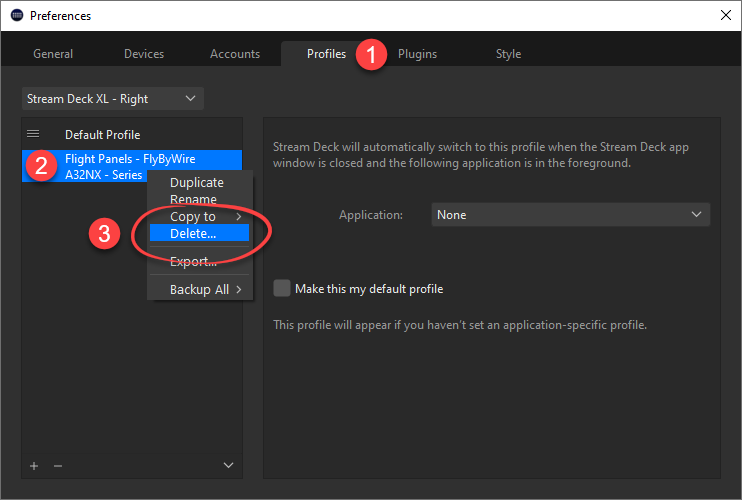
- Open your Stream Deck Application and navigate to Settings
- Select the Profiles tab at the top of the settings window
- Select your Stream Deck device from the drop down list
- Locate and select the profile that you wish to remove from the list
- Right click on the profile name and select Delete
Was this article helpful?
That’s Great!
Thank you for your feedback
Sorry! We couldn't be helpful
Thank you for your feedback
Feedback sent
We appreciate your effort and will try to fix the article